
How to Remove Scam Pop Ups in Windows

So you are browsing the web with Microsoft Edge, Google Chrome, or Firefox and get a popup scam that says your computer is infected with a virus, malware, etc or that there are numerous other issues with your computer and gives a number to call. These are pages created as a scare tactic for you to call and allow a scammer to get access to your system and info. These are not an actual threat to the system and can be easily removed by following these steps:
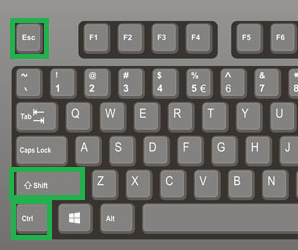
- Open the Task Manager, Press Ctrl + Shift + Esc.
- Select your internet browser (Edge, Internet Explorer, Chrome, Firefox) and select End Task


- Now the popup scam should be gone from the screen. There are a couple more steps to make sure that this pop up does not reappear the next time you open your browser.
- Press the Windows (or Start) key on your keyboard, and the letter R at the same time to open a Run utility.


- In the Run utility, type the command that corresponds to the browser you were using, then click OK:
chrome www.microcenter.com
firefox www.microcenter.com
iexplore www.microcenter.com
microsoft-edge:www.microcenter.com
*Note: the command for Edge is slightly different than the others
- A new browser window will now open to microcenter.com, depending on your settings though, the scam pop up may also reload in the background

- Close the browser normally, by clicking the X in the top right corner.

- You can now open your browser normally, the pop up will not reappear.
Last Updated: 10/16/2020