


Your Pro AI Destination
Pushing the limits of AI requires the right hardware. At Micro Center, you’ll find everything from Blackwell-based GPUs to high-performance systems capable of running 200B+ parameter large language models locally. Whether you’re driving open-source research and development or building next-generation AI applications, we’re the retailer that supplies innovators, researchers, and enthusiasts with the tools to achieve cutting-edge artificial intelligence performance.


Smarter Systems Start with Smarter Parts

Next Generation CPUs
- Beyond NPU and iGPU, CPUs now share AI workloads
- More PCIe lanes and memory channels improve data flow
- Higher core and thread counts boost AI inferencing
- Built to scale with future AI applications

GPU / VRAM
- Powers generative image models like Stable Diffusion from text promp
- More VRAM handles larger datasets and longer context windows
- GPUs speed up training and inferencing for AI workflows
- NVIDIA Blackwell architecture delivers efficiency and scale

System Memory
- Rule of thumb: 2.5× your GPU’s VRAM
- More memory means smoother AI performance
- Speed and bandwidth directly impact results
- Low latency keeps inferencing responsive
- Extra capacity supports multitasking and larger models

OS / Software
- Windows supports a wide range of tools and workflows
- NVIDIA DGX delivers a turnkey AI ecosystem
- NVIDIA CUDA stack powers GPU compute and integrated graphics
- ROCm provides open-source GPU acceleration on AMD hardware
- Open-source frameworks ensure flexibility and community support
Storage
- PCIe Gen 5 SSDs deliver top-tier throughput and responsiveness
- Storage needs scale with LLM size and dataset volume
- NVMe drives reduce latency and speed up inferencing
- RAID or multi-drive setups can separate datasets from OS for efficiency and reliability

Use Case / LLM Selection
- Fine-tuning for domain-specific tasks
- Development and testing across frameworks
- Run open LLMs like GPT, Llama, DeepSeek, Qwen, and Mistral
- Emerging use cases include multi-agent systems and RAG
About Pro AI Workstations
Pro AI workstations span a wide range of form factors, use cases, and software certifications. At Micro Center, we help you navigate the options between mobile and desktop systems, recommending configurations that fit everything from casual inferencing to the most demanding AI workloads. The first decision is where your work will run: fixed in one location, on the go, or a hybrid of both. Mobile points to a notebook workstation, fixed performance favors a robust desktop build, and hybrid setups often pair a portable notebook with solutions like the NVIDIA DGX Spark to offload heavier AI tasks to a compact “micro” desktop.
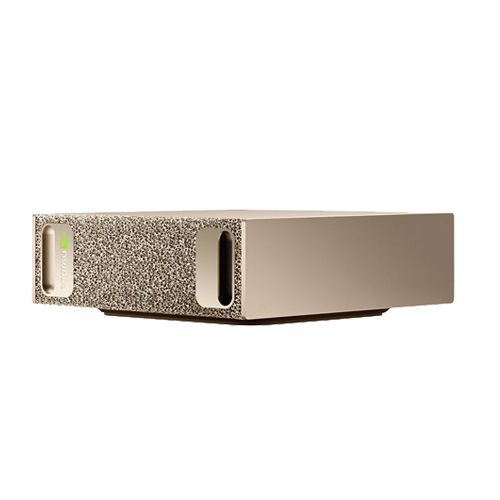
NVIDIA DGX Spark
Desktop Pro AI Workstations
-
 Designed for fixed work
environments requiring
scalability
Designed for fixed work
environments requiring
scalability
- Support robust configurations with
powerful
graphics cards
- Handle large LLMs and demanding AI
workloads
- Maximize network throughput for
faster data
movement
- Scales toward cluster-level
performance for
enterprise AI demands
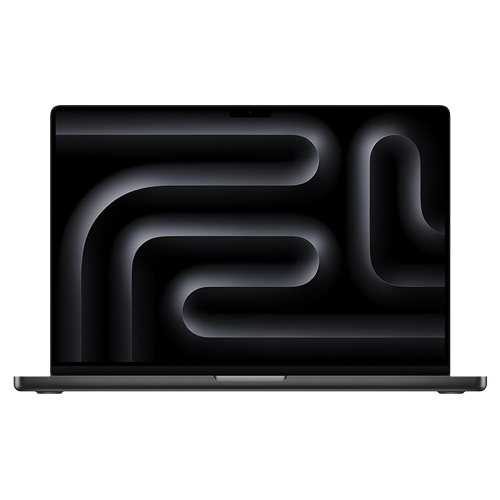
MacBook Pro 16” Computer
Mobile Pro AI Workstations
- Run LLMs locally from a notebook
workstation
- Manage AI data effectively and
efficiently across
locations
- Balance portability with strong
computer
performance
- Ready for edge AI and on-site
inferencing in
dynamic environments
Compare Devices
Recommended HW for Meta-Llama-3.1-70B-InstructChoosing the right hardware for training or inference depends on your model size, precision requirements, and GPU memory capacity. This comparison makes it easy to see how different system builds perform across fine-tuning and inferencing tasks. Review VRAM needs, recommended GPUs, and system tiers (Good, Better, Best) to match your project’s scale.
| Precision | Model Size | GPU VRAM Needed | Good System | Better System | Best System |
|---|---|---|---|---|---|
| float16 | 130 GB | 155 GB | NVIDIA DGX SPARK FE (X2) 20 Core ARM Processor GB10 Blackwell GPU 128GB LPDDR5X 4TB NVME M.2 w/Self-encryption DGX OS |
||
| int8 | 65 GB | 78 GB | Apple Mac Studio M4 Max 16C CPU M4 Max 40C GPU 128GB Unified Memory 2TB SSD Mac OS |
HP Z2 Mini G1A AMD Ryzen AI Max + Pro 395 AMD Radeon 8060S (Up to 96GB) 128GB LPDDR5X 2TB Gen4 NVME M.2 SSD Win 11 Pro |
NVIDIA DGX SPARK FE 20 Core ARM Processor GB10 Blackwell GPU 128GB LPDDR5X 4TB NVME M.2 w/Self-encryption DGX OS |
| int4 | 32 GB | 39 GB | Apple MacBook Pro 16 M4 Max 16C CPU M4 Max 40C GPU 48GB Unified Memory 1TB SSD MacOS |
HP ZBook Ultra G1A AMD Ryzen AI Max + Pro 395 AMD Radeon 8060S (Up to 96GB) 128GB LPDDR5X 2TB Gen4 NVME M.2 SSD Win 11 Pro |
PowerSpec AI200 Tower* Threadripper 9970X NVIDIA RTX PRO 5000 Blackwell 128 GB ECC RDIMM DDR5 4TB Gen5 SSD Win 11 Pro |
| Mode | Precision | Model Size | GPU VRAM Needed | Good System | Better System | Best System |
|---|---|---|---|---|---|---|
| LoRa (2% trainable) | float 16 | 130 GB | 140 GB | NVIDIA DGX SPARK FE (X2) 20 Core ARM Processor GB10 Blackwell GPU 128GB LPDDR5X 4TB NVME M.2 w/Self-encryption DGX OS |
||
| LoRa (2% trainable) | int8 | 65 GB | 70 GB | HP ZBook Ultra G1A Mini* AMD Ryzen AI Max + Pro 395 AMD Radeon 8060S (Up to 96GB) 128GB LPDDR5X 2TB Gen4 NVME M.2 SSD Win 11 Pro |
NVIDIA DGX SPARK FE 20 Core ARM Processor GB10 Blackwell GPU 128GB LPDDR5X 4TB NVME M.2 w/Self-encryption DGX OS |
PowerSpec AI300 Tower* Threadripper PRO 9975WX NVIDIA RTX PRO 6000 Blackwell 256 GB ECC RDIMM DDR5 4TB Gen5 SSD Windows 11 Pro |
| QLoRa (2% trainable) | int4 | 32 GB | 35 GB | Apple Mac Studio M4 Max 16C CPU M4 Max 40C GPU 128GB Unified Memory 2TB SSD Mac OS |
HP ZBook Ultra G1A Mini* AMD Ryzen AI Max + Pro 395 AMD Radeon 8060S (Up to 96GB) 128GB LPDDR5X 2TB Gen4 NVME M.2 SSD Win 11 Pro |
PowerSpec AI200 Tower* Threadripper 9970X (32C/64T) 5000 Blackwell Pro 128 GB ECC RDIMM DDR5 4TB Gen5 SSD Windows 11 Pro |
LoRa (Low-Rank Adaptation) and QLoRa (Quantized Low-Rank) Adaptation) are techniques used to fine tuning LLMs without modifying the entire model.
INFERENCING
float32

Model Size
27.96 GB
GPU VRAM Needed
33.55 GB
Recommended GPU
1 x RTX 5000 Blackwell
Good System
Apple M4 Max/128/2
Better System
PowerSpec AI100 9960X/5090/128/2/P
Best System
PowerSpec AI200 9970X/5000B/128/4/P*
float16/bfloat16
Model Size
13.98 GB
GPU VRAM Needed
16.77 GB
Recommended GPU
1 x RTX 4000 Blackwell
Good System
Apple M4 Max/64/2
Better System
Apple MacBook 16 M4/48/1TB
Best System
PowerSpec AI100 9960X/5090/128/2/P
int8
Model Size
6.99 GB
GPU VRAM Needed
8.39 GB
Recommended GPU
1 x RTX 2000 ADA
Good System
Apple Macbook/M3/32/1
Better System
Apple M4 Max/32/1
Best System
HP ZBook G1A Ultra 395+/128GB/2TB
int4
Model Size
3.49 GB
GPU VRAM Needed
4.19 GB
Recommended GPU
1 x RTX A1000
Good System
Apple M4/16/1
Better System
Apple Macbook M4'32/1
Best System
HP Z2 G1A Mini 395+/128/2/P
FINE TUNING
Full-fine tuning
Model Size
27.96 GB
GPU VRAM Needed
55.92 GB
Recommended GPU
1 x RTX 6000 Blackwell
Good System
PowerSpec AI200 9970X/5000B/128/4/P*
Better System
HP Z2 G1A Mini 395+/128/2/P
Best System
NVIDA DGX SPARK (FE)
LoRa (2% trainable)
Model Size
27.96 GB
GPU VRAM Needed
30.19 GB
Recommended GPU
1 x RTX 5000 Blackwell
Good System
Apple M4 Max/128/2
Better System
HP ZBook G1A Ultra 395+/128/2/P
Best System
NVIDA DGX SPARK (FE)
LoRa (2% trainable)
Model Size
13.98 GB
GPU VRAM Needed
15.1 GB
Recommended GPU
1 x RTX 4000 Blackwell
Good System
Apple M4 Max/64/2
Better System
Apple MacBook 16 M4/48/1TB
Best System
PowerSpec AI100 9960X/5090/128/2/P
LoRa (2% trainable)
Model Size
6.99 GB
GPU VRAM Needed
7.55 GB
Recommended GPU
1 x RTX 2000 ADA
Good System
Apple M4 Max/32/1
Better System
HP Z2 G1A Mini 395+/128/2/P
Best System
PowerSpec AI100 9960X/5090/128/2/P
QLoRa (2% trainable)
Model Size
3.49 GB
GPU VRAM Needed
3.77 GB
Recommended GPU
1 x RTX A1000
Good System
Apple M4/16/1
Better System
HP Z2 G1A Mini 395+/128/2/P
Best System
PowerSpec AI100 9960X/5090/128/2/P
Shop Pro AI Products





AI News
View All Articles


Can Your PC Run OpenAI's New GPT-OSS Large Language Models?
These new AI models from the maker of ChatGPT are available for anyone to download and run, if you have enough RAM and processing power.


Chain of Thought: AI's New Reasoning Revolution
New AI models learn to "show their work" with step-by-step transparency.


The Small Business Owner's Guide to AI Analytics
Small businesses need to pick the right software (and hardware) to get the most out of AI.
AI FAQ: Choosing the right Pro AI System at Micro Center

What kind of AI products does Micro Center offer?

How do I determine which Pro AI system is right for me?
- CPU: Impacts core and thread count, memory channels, and capacity.
- GPU: Controls the size of LLMs (in billions of parameters) you can run locally. Multiple GPUs or remote GPU software can expand performance.
- RAM: Rule of thumb is 2.5 times your GPU VRAM for LLM loading and computation.
- OS and Software Stack: NVIDIA CUDA, AMD ROCm, or open-source tools like Hugging Face and Ollama. Linux and Ubuntu are common. Windows requires WSL, which adds overhead.
- Storage: PCIe Gen 5 drives perform best for loading and unloading LLMs. Ensure enough space for models, apps, and instances.
Is there a way to compare different AI devices?
Which AI application stack should I choose?
- NVIDIA: Blackwell GPUs, CUDA software, and DGX Spark. Strong ecosystem with robust support. Higher cost but widely used.
- Integrated Graphics (AMD or Intel): CPUs with onboard GPUs, such as AMD Ryzen AI with ROCm. Lower cost, more setup complexity, and open-source focus.
- Open Source: Flexible and community-driven. Platforms like Hugging Face, GitHub, and Ollama let you run open LLMs on Intel, AMD, or NVIDIA. Best for developers and smaller teams.
How can I stay up to date on the latest AI products and developments?
Our Top Picks for Pro AI Workstations
Shop our top picks for AI-ready systems, hand-selected to deliver the performance you need for everything from LLM inferencing to generative AI development.
Shop All Pro AI Systems
- 20 core Arm, 10 Cortex-X925 + 10 Cortex-A725 Arm
- 128GB LPDDR5x Unified RAM
- 4TB Solid State Drive
- NVIDIA Blackwell Architecture
- NVIDIA DGX OS
- 10GbE LAN
- WiFi 7
- Bluetooth 5.4
$4,699.99

- AMD Ryzen Threadripper 9960X 4.2GHz Processor
- NVIDIA GeForce RTX 5090 32GB GDDR7
- 128GB DDR5-5600 RAM ECC RDIMM
- Samsung 9100 PRO 2TB SSD
- Microsoft Windows 11 Pro
- 10GbE LAN+2.5GbE LAN
- WiFi 7
- Bluetooth 5.4
- 360mm AIO Cooler
$10,999.99
IN-STORE ONLY